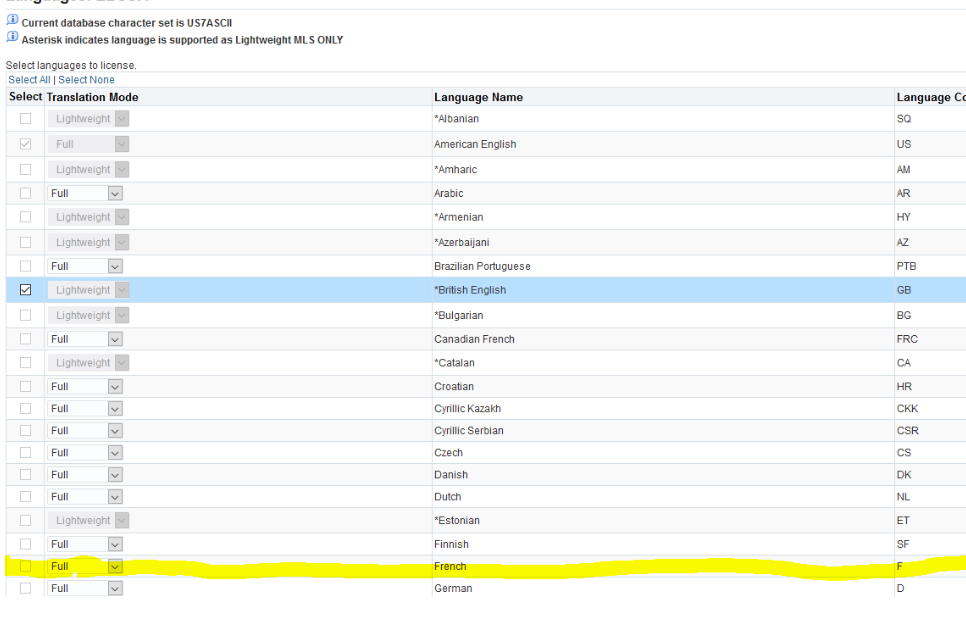
Hi all,
I will appreciate your assistance on activating French language on my instance which is one
node having NLS_CHARACTERSET=US7ASCII and the base language US AMERICAN
I'm following oracle Doc:Oracle E-Business Suite NLS Release Notes, Release 12.2 (Doc ID 1314621.1)
and
R11i/R12: Requesting Translation Synchronization Patches (Doc ID 252422.1)
on DOC:(Doc ID 252422.1)
Section 2 : Before Requesting Translation Synchronization Patch
If you are planning to request Translation Synchronization patch for a language which has not been installed in your instance, you need to do the following:
Go to the Oracle Applications Manager (OAM) License Manager to activate the language.
Run the AD Administration utility to maintain multi-lingual tables from the Maintain Applications Database Entities menu.
See Installing Translations in the Oracle Applications NLS Release Notes of your current release level. For example, if your system is at 12.2 level, you should refer to Note 1314621.1, Oracle Applications NLS Release Notes, Release 12.2.X
My Issue lies on step 1:
When I try to select French as the language I need to activate the checkbox is inactive hence I'm
unable to select.
If you have a solution for this your help will be highly appreciated.