I have 3D stacked column chart with the below query in my application.
select null, upper(replace (substr (A.MANAGER_EMAIL,1,length(A.MANAGER_EMAIL) - length(substr(A.MANAGER_EMAIL,instr(A.MANAGER_EMAIL,'@',1)))),'.',' '))||'(%)' MANAGER_MAIL,
case WHEN NVL(:p30_lov1,:P30_CURRENT_YEAR||:P30_CURRENT_QUARTER) = :P30_CURRENT_YEAR||:P30_CURRENT_QUARTER THEN (((sum(A.CURRENT_QUARTER)) /((select count(distinct DEPARTMENT) from dashboard where upper(manager_email) = upper(A.manager_email))*100) )*100)
WHEN :p30\_lov1 = :P30\_PREVIOUS\_YEAR1||:P30\_PREVIOUS\_QUARTER1 THEN (((sum(A.PREVIOUS\_QUARTER1))/((select count(distinct DEPARTMENT) from dashboard where upper(manager\_email) = upper(A.manager\_email))\*100))\*100)

WHEN :p30\_lov1 = :P30\_PREVIOUS\_YEAR2||:P30\_PREVIOUS\_QUARTER2 THEN (((sum(A.PREVIOUS\_QUARTER2))/((select count(distinct DEPARTMENT) from dashboard where upper(manager\_email) = upper(A.manager\_email))\*100))\*100)

WHEN :p30\_lov1 = :P30\_PREVIOUS\_YEAR3||:P30\_PREVIOUS\_QUARTER3 THEN (((sum(A.PREVIOUS\_QUARTER3))/((select count(distinct DEPARTMENT) from dashboard where upper(manager\_email) = upper(A.manager\_email))\*100))\*100) end as count
from DASHBOARD A
where upper(director_email) = upper(:P30_CURRENT_EMAIL)
and metric = 'Eligible vs Actual as %'
group by manager_email;
As we clearly see here i am calculation percentage. When i am using 3D stacked column chart it displays the chart properly as below.
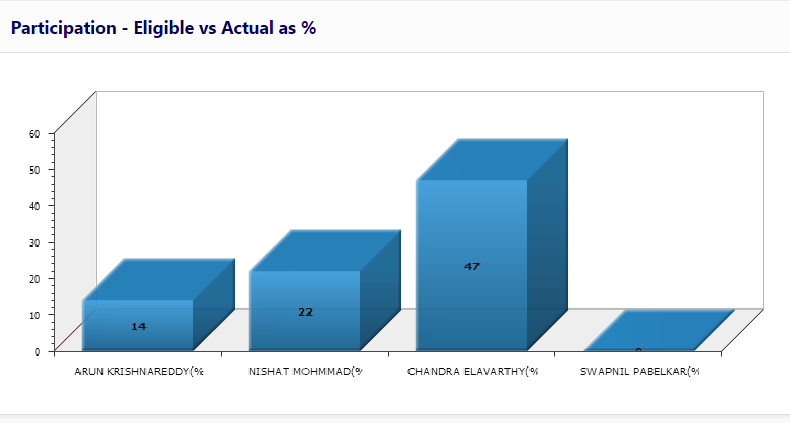
Since user wants to display the value as percentage, i have changed the chart type to 3D Stacked column - percent chart type. But its not displaying the calculated value. Please check the image below

Whats wrong here? My query or the chart design.. Why it is showing 100% instead the actual 14%. I am stuck here trying multiple options but couldn't get any answer to my issue.