Skip to Main Content

SQL Developer

Announcement

For appeals, questions and feedback about Oracle Forums, please email oracle-forums-moderators_us@oracle.com. Technical questions should be asked in the appropriate category. Thank you!

[17.2] - Popup Describe - Details tab

BuntoroJul 18 2017 — edited Jul 18 2017

Hi,

I am using SQL Dev 17.2 with JDK 8u72 on Windows.

There is something strange on Popup Describe - tab Details.

Here is the step to reproduce :

1. Open pop up describe
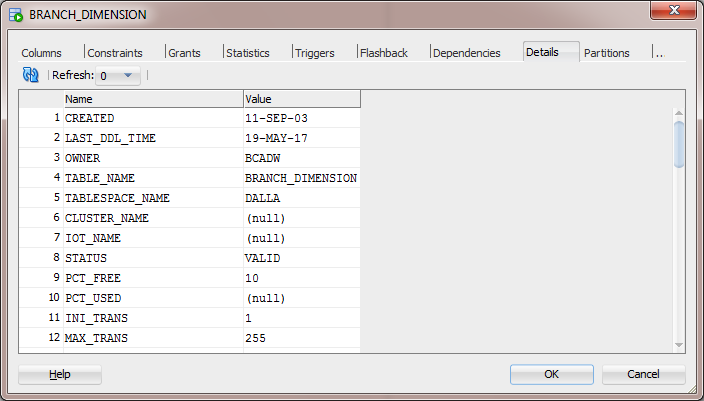
![pastedImage_1.png](https://objectstorage.us-phoenix-1.oraclecloud.com/p/BqK85Rn1zA5MP0vYiqbAdPgs7Z6OmMxw8SD3WCFVm5kY8uReidZ1KPIKkgJ1hCkG/n/axciphqpnohg/b/forums-legacy/o/uploads/jive_attachments/8/1/8/81819354egami.png)

2. Open any table from tree list

A new tab will open for that underlying table.

Click on Details tab.

3. Switch back to the SQL Worksheet

Now open popup describe once again
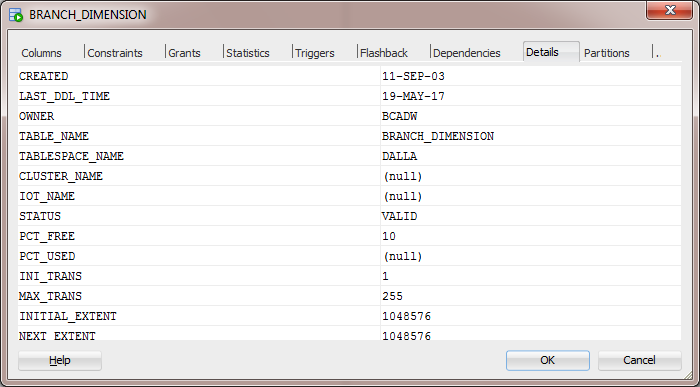
![pastedImage_0.png](https://objectstorage.us-phoenix-1.oraclecloud.com/p/BqK85Rn1zA5MP0vYiqbAdPgs7Z6OmMxw8SD3WCFVm5kY8uReidZ1KPIKkgJ1hCkG/n/axciphqpnohg/b/forums-legacy/o/uploads/jive_attachments/5/0/8/50819354egami.png)

Notice the disappearance of Refresh button, row number and also the vertical scroll bar on the right side.

Regards,

Buntoro

Comments
Locked Post
New comments cannot be posted to this locked post.
Post Details
Locked on Aug 15 2017
Added on Jul 18 2017
2 comments
337 views